

- Fougerite Compatibility
- 1.0.8
- Plugin's Engine
- C# (Modules)
Description:
With this plugin you will be able to create and give item kits.
Feautures:
(Ingame)Commands:
Inside the KitManager 1.2.rar you will find 3 files:
http://fougerite.com/threads/how-to-install-c-plugins.387/#post-3770
The KitManager.xml MUST be placed in the same location as the KitManager.dll
(if that is not the case the kitmanager.dll will create a new one at server init)
To add/modify/remove kits we have to modify the KitManager.xml which you will find in the KitManager 1.2.rar
after opening the KitManager.xml you should see this:
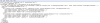
Inside the KitManager.xml we can change the following:
1) Change the KitManager Ingame chat name by changing the value of KitManagerChatName="Kits"
(Note: DO NOT REMOVE THE quotation marks -> "")
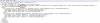
2) Adding new Kits, modifying existing ones and removing a kit.
To make a new kit, copy the Kit element (<Kit UseKit="True" ChatName="starter" AdminOnly="False" AutoGiveOnSpawn="False" CooldownSeconds="30"> TILL </Kit>) AND paste if after a existing </Kit> Tag
(pictures below show the process)
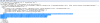
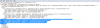
3) Adding new Items to the Kit
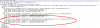
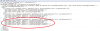
Now we have created a new Kit, we can start modifying it's values
We might want the kit to be given at command, different items/amounts/ slottype and change the kitname.
Changeable Attributes:
Kit:
(DO NOT REMOVE THE quotation marks -> "" of any attribute)
Kit Chat Name:
The kit chat name (attribute of Kit) MUST be unique in order to be loaded properly.
Example:
Solution:
With this plugin you will be able to create and give item kits.
Feautures:
- Kit given on command.
- (Multiple)Kit auto given on spawn.
- Kit for players or admin (rcon) only.
- Customizable item slot (Wear, Belt, Inventory)
- Multiple kit definitions (Auto given or by command).
(Ingame)Commands:
- /kit <name>
- /kits
-How to Install the plugin-
Inside the KitManager 1.2.rar you will find 3 files:
- KitManager.dll
- KitManager.xml
- ItemList.txt
http://fougerite.com/threads/how-to-install-c-plugins.387/#post-3770
The KitManager.xml MUST be placed in the same location as the KitManager.dll
(if that is not the case the kitmanager.dll will create a new one at server init)
-How to Add/Modify/Remove Kits-
To add/modify/remove kits we have to modify the KitManager.xml which you will find in the KitManager 1.2.rar
after opening the KitManager.xml you should see this:
Inside the KitManager.xml we can change the following:
1) Change the KitManager Ingame chat name by changing the value of KitManagerChatName="Kits"
(Note: DO NOT REMOVE THE quotation marks -> "")
2) Adding new Kits, modifying existing ones and removing a kit.
To make a new kit, copy the Kit element (<Kit UseKit="True" ChatName="starter" AdminOnly="False" AutoGiveOnSpawn="False" CooldownSeconds="30"> TILL </Kit>) AND paste if after a existing </Kit> Tag
(pictures below show the process)
3) Adding new Items to the Kit
Now we have created a new Kit, we can start modifying it's values
We might want the kit to be given at command, different items/amounts/ slottype and change the kitname.
Changeable Attributes:
Kit:
- UseKit="True" <- Change to True or False (If it is set to False the kit will not be loaded/useable ingame.)
- ChatName="autoSpawnKit1" <- Change the ingame kit name (this will be the /kit <name> where name is the value of ChatName)
- AdminOnly="False" <- Change to True or False
- AutoGiveOnSpawn="True" <- Change to True or False
- CooldownSeconds="0" <- the cooldown seconds in a numeric value WITHOUT precision.
- MaxUsageCount="3" <-The amount of times a player can use a kit. (infinite or default should be 0)
- Item Name="Stone Hatchet" <- The item name (CASE SENSITIVE) for a full list of items that you are able to spawn go to: http://playrustwiki.com/wiki/List_of_Items OR look inside the ItemList.txt
- Amount="1" <- the amount to give in a numeric value WITHOUT precision.
- InventorySlotType="Inventory" <- The item slot type the kit will attempt to put the item at VALUES: Wear, Belt, Inventory
(DO NOT REMOVE THE quotation marks -> "" of any attribute)
-Notes-
Kit Chat Name:
The kit chat name (attribute of Kit) MUST be unique in order to be loaded properly.
Example:
- Kit chat name: starter
- Kit chat name: StaRTeR
Solution:
- kit chat name: starter
- kit chat name: starter1 (or just a different name).

