Checking if player is on his foundation (proper way)

MasterPeace

Retired Staff
Retired Staff
Feb 2, 2015
269
69
28
45
Poland
Hi.

I'm using right now code from Dretax HomeSystem 3.5 plugin, edited it a little bit, but it get looped (and crashing game).

Plugin is checking if Victim is in his house, or not, or not inside of any house.

Python:
def On_PlayerHurt(self, Hurt):
        attacker = Hurt.Attacker
        victim = Hurt.Victim
    
        if len(attacker.SteamID) > 15:
            Server.Broadcast("Attacker is player") #DEBUG
        
            id = victim.SteamID
            player_location = Util.CreateVector(victim.X, victim.Y, victim.Z)
            type = Util.TryFindReturnType("StructureComponent")
            objects = UnityEngine.Object.FindObjectsOfType(type)
            Server.Broadcast("Searching for house")
            for x in objects:
                if "Foundation" in x.name or "Ceiling" in x.name or "Stairs" in x.name:
                    dist = round(Util.GetVectorsDistance(player_location, x.gameObject.transform.position), 2)
                    if dist > float(5): # Checking if player is near house
                        Server.Broadcast("Victim is off house")
                        continue
                    ownerid = long(x._master.ownerID)
                    if ownerid == long(id): # Checking if player is owner
                        Server.Broadcast("Victim is probably house owner")
                        continue
                    else:
                        Server.Broadcast("Victim is raider")
But it getting looped. It's working only if I clear first instruction "if dist > float5():" and just leave there "continue", like in Dretax plugin. But I want this to work like here:

1. What if Victiom is outside house (what if inside) (distance 5)
2. What if it's his house
3. What if not

And I know that i need to use for this "for" loop. But don't really know how to do this to not loop server. I'm not good at this.

Could you help? I would like to write some Wiki page to explain how to use it properly.. But first I need to know myself. Of course don't look at Player checking method, it's not a problem right now as I don't want to check if attacker is player. First I need to set loop.
 
Last edited:

DreTaX

Probably knows the answer...
Administrator
Jun 29, 2014
4,093
4,784
113
At your house.
github.com
Hi.

I'm using right now code from Dretax HomeSystem 3.5 plugin, edited it a little bit, but it get looped (and crashing game).

Plugin is checking if Victim is in his house, or not, or not inside of any house.

Python:
def On_PlayerHurt(self, Hurt):
        attacker = Hurt.Attacker
        victim = Hurt.Victim
   
        if len(attacker.SteamID) > 15:
            Server.Broadcast("Attacker is player") #DEBUG
       
            id = victim.SteamID
            player_location = Util.CreateVector(victim.X, victim.Y, victim.Z)
            type = Util.TryFindReturnType("StructureComponent")
            objects = UnityEngine.Object.FindObjectsOfType(type)
            Server.Broadcast("Searching for house")
            for x in objects:
                if "Foundation" in x.name or "Ceiling" in x.name or "Stairs" in x.name:
                    dist = round(Util.GetVectorsDistance(player_location, x.gameObject.transform.position), 2)
                    if dist > float(5): # Checking if player is near house
                        Server.Broadcast("Victim is off house")
                        continue
                    ownerid = long(x._master.ownerID)
                    if ownerid == long(id): # Checking if player is owner
                        Server.Broadcast("Victim is probably house owner")
                        continue
                    else:
                        Server.Broadcast("Victim is raider")
But it getting looped. It's working only if I clear first instruction "if dist > float5():" and just leave there "continue", like in Dretax plugin. But I want this to work like here:

1. What if Victiom is outside house (what if inside) (distance 5)
2. What if it's his house
3. What if not

And I know that i need to use for this "for" loop. But don't really know how to do this to not loop server. I'm not good at this.

Could you help? I would like to write some Wiki page to explain how to use it properly.. But first I need to know myself. Of course don't look at Player checking method, it's not a problem right now as I don't want to check if attacker is player. First I need to set loop.
I think you misunderstood It.

continue = Stop right there, and continue for the next object. (get the next x variable)
break = kill the for cycle, but continue the code below the for cycle.
return = Stop the whole function and return.
 

DreTaX

Probably knows the answer...
Administrator
Jun 29, 2014
4,093
4,784
113
At your house.
github.com
Hi.

I'm using right now code from Dretax HomeSystem 3.5 plugin, edited it a little bit, but it get looped (and crashing game).

Plugin is checking if Victim is in his house, or not, or not inside of any house.

Python:
def On_PlayerHurt(self, Hurt):
        attacker = Hurt.Attacker
        victim = Hurt.Victim
   
        if len(attacker.SteamID) > 15:
            Server.Broadcast("Attacker is player") #DEBUG
       
            id = victim.SteamID
            player_location = Util.CreateVector(victim.X, victim.Y, victim.Z)
            type = Util.TryFindReturnType("StructureComponent")
            objects = UnityEngine.Object.FindObjectsOfType(type)
            Server.Broadcast("Searching for house")
            for x in objects:
                if "Foundation" in x.name or "Ceiling" in x.name or "Stairs" in x.name:
                    dist = round(Util.GetVectorsDistance(player_location, x.gameObject.transform.position), 2)
                    if dist > float(5): # Checking if player is near house
                        Server.Broadcast("Victim is off house")
                        continue
                    ownerid = long(x._master.ownerID)
                    if ownerid == long(id): # Checking if player is owner
                        Server.Broadcast("Victim is probably house owner")
                        continue
                    else:
                        Server.Broadcast("Victim is raider")
But it getting looped. It's working only if I clear first instruction "if dist > float5():" and just leave there "continue", like in Dretax plugin. But I want this to work like here:

1. What if Victiom is outside house (what if inside) (distance 5)
2. What if it's his house
3. What if not

And I know that i need to use for this "for" loop. But don't really know how to do this to not loop server. I'm not good at this.

Could you help? I would like to write some Wiki page to explain how to use it properly.. But first I need to know myself. Of course don't look at Player checking method, it's not a problem right now as I don't want to check if attacker is player. First I need to set loop.
At the other thread I also posted 3 ways how to check if the attacker is a player.
 

Snake

Moderator
Moderator
Jul 13, 2014
288
174
28
Hi.

I'm using right now code from Dretax HomeSystem 3.5 plugin, edited it a little bit, but it get looped (and crashing game).

Plugin is checking if Victim is in his house, or not, or not inside of any house.

Python:
def On_PlayerHurt(self, Hurt):
        attacker = Hurt.Attacker
        victim = Hurt.Victim
  
        if len(attacker.SteamID) > 15:
            Server.Broadcast("Attacker is player") #DEBUG
      
            id = victim.SteamID
            player_location = Util.CreateVector(victim.X, victim.Y, victim.Z)
            type = Util.TryFindReturnType("StructureComponent")
            objects = UnityEngine.Object.FindObjectsOfType(type)
            Server.Broadcast("Searching for house")
            for x in objects:
                if "Foundation" in x.name or "Ceiling" in x.name or "Stairs" in x.name:
                    dist = round(Util.GetVectorsDistance(player_location, x.gameObject.transform.position), 2)
                    if dist > float(5): # Checking if player is near house
                        Server.Broadcast("Victim is off house")
                        continue
                    ownerid = long(x._master.ownerID)
                    if ownerid == long(id): # Checking if player is owner
                        Server.Broadcast("Victim is probably house owner")
                        continue
                    else:
                        Server.Broadcast("Victim is raider")
But it getting looped. It's working only if I clear first instruction "if dist > float5():" and just leave there "continue", like in Dretax plugin. But I want this to work like here:

1. What if Victiom is outside house (what if inside) (distance 5)
2. What if it's his house
3. What if not

And I know that i need to use for this "for" loop. But don't really know how to do this to not loop server. I'm not good at this.

Could you help? I would like to write some Wiki page to explain how to use it properly.. But first I need to know myself. Of course don't look at Player checking method, it's not a problem right now as I don't want to check if attacker is player. First I need to set loop.
Okey, I get what you want to do but looping on all Structures when a player is hit is a very very bad idea.

Any server can reach easily 50k structures and we don't have quantum computers. Imagine 3 players shooting at the same time each other. In less than a second looping through 150k objects and calculating distances and wtf the server will get unresponsive.

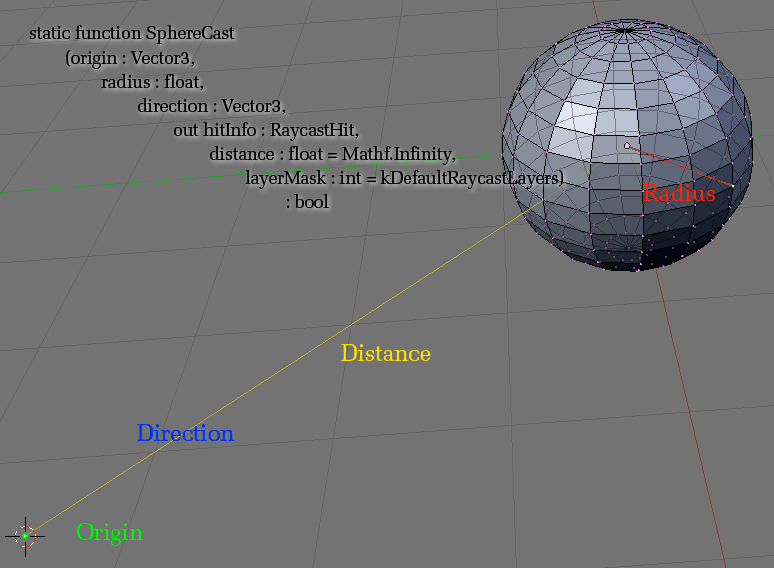
So, to do this the best option is to use Unity's SphereCast method.

This method returns the colliders near a collider in all directions, like creating an sphere on a player and whatever is inside the sphere or touches it is returned.

This is way faster and less cpu demandant.

So, in C#, I would do :

C#:
RaycastHit[] hits = UnityEngine.Physics.SphereCastAll(player.Location, 5f, new Vector3(0, 0, 0), 0f);

foreach (RaycastHit hit in hits)
{
     if (hit.transform.name.Equals("__MESHBATCH_PHYSICAL_OUTPUT", StringComparison.Ordinal))
     {
          // There's an structure near the guy
     }
}
Explanation :

UnityEngine.Physics.SphereCastAll() is an overloaded method. I'm using the one that uses :
  • Vector3 origin
  • float radius
  • Vector3 direction
  • float distance

So, to unsertand those arguments, this image is quite good :


So what we do is, from the player.Location (origin), we draw a sphere of 5 (radius) in a direction 0,0,0 and distance 0.

Direction 0,0,0 and distance 0 means that the sphere is done in the player.Location itself, so we are getting whatever is at 5 meters from the player in all directions.

Then, whatever hit we get, we check it's transform name. By my own investigation I've found that Structures are named "__MESHBATCH_PHYSICAL_OUTPUT", so we check if the hit name equals that.

If so, then it's a Structure.


Now, by accessing the "hit.collider", you should be able to get the Entity. But that needs some more work and I ran out of time by writing all this stuff.

If you find how to get the Entity from that cool, if not I'll give it a try when I have more time.


I hope it helps ! (I know it's very long but worth xd)
 

MasterPeace

Retired Staff
Retired Staff
Feb 2, 2015
269
69
28
45
Poland
Yea, but I don't have time for developing this, as I have other plugins to make, so I just left it for future.

Now for example I have big problems with server crashing from yesterday, and I have no idea what is causing this. Sometimes it crashes after hour, sometimes after 4 hours....

I'm starting of thinking about C# plugins, maybe mine are just too heavy or something as I added today new, and I'll add more. But I can't see any tutorial how to develop plugins in C#. It could be better for me as I still don't like some : and empty end of lines and whatever Python like to have.

He is not even saving player properties to Database. 3 hours and no save. Bullshit.
 
Last edited:

DreTaX

Probably knows the answer...
Administrator
Jun 29, 2014
4,093
4,784
113
At your house.
github.com
Yea, but I don't have time for developing this, as I have other plugins to make, so I just left it for future.

Now for example I have big problems with server crashing from yesterday, and I have no idea what is causing this. Sometimes it crashes after hour, sometimes after 4 hours....

I'm starting of thinking about C# plugins, maybe mine are just too heavy or something as I added today new, and I'll add more. But I can't see any tutorial how to develop plugins in C#. It could be better for me as I still don't like some : and empty end of lines and whatever Python like to have.

He is not even saving player properties to Database. 3 hours and no save. Bullshit.
Any crash log?
 

MasterPeace

Retired Staff
Retired Staff
Feb 2, 2015
269
69
28
45
Poland
I have 3 crash logs if you can read them - I don't understand them. It's still Fougerite 1.0.8 RC2 if I'm not wrong, what you gived me one time on PM.

Other logs:
1. I had about 6 crashes. 2 had no errors.
2. One of other three crashed after error of HomeSystem 2 (what I explained in Home System topic, it's only on Linux). After this error I saw errors of my C4 and Radiation Callback functions. So I decided to remove TP functionality from HomeSystem, as it's not working anyway, but it will be better without error.

3. One of other three crashed after use of /starter (kit).

4. One of them crashed after use of my Shop plugin. But it had no error...

5. Recent crash is after this:
Code:
[3/7/2015 12:30:11 PM] [Exception] [ Hooks->EntityHurt | DeployableObject->OnHurt | Component->SendMessage | TakeDamage->Hurt | TakeDamage->HurtShared | TakeDamage->HurtShared | TakeDamage->Hurt | MeleeWeaponDataBlock->DoAction1 | ItemRepresentation->RunAction | ItemRepresentation->RunServerAction | ItemRepresentation->Action1 | ItemRepresentation->Action1B | MonoMethod->InternalInvoke | MonoMethod->Invoke | MethodBase->Invoke | #=qaL2AMBCaBLCj4lGSCwjcBVYUs_5vzeQVgu44HVklVYQ=->#=qG_E6hqIvz6NLWQQCT2N5IA== | #=q$NUWz6aT_ypN3cz7K6ce2gVWapiYAlnLPGzKjIUfT2w=->#=qS9ntZNSJqwnPkZv_HZvsug== | NetworkView->OnRPC | NetworkViewBase->#=qpJfiNEhSKsosBj54zW21Bw== | #=qjg$mq9k6hZwR1eaAS3eQ4dux$3oD_j8CRZte$f$nFV0=->#=qlGEZiB55BOeKhe33IbTgs3lVmx7rHXWsIFfTvKtNlrQ= | #=qjg$mq9k6hZwR1eaAS3eQ4dux$3oD_j8CRZte$f$nFV0=->#=qIPn628V9gmXGKu9CDwAT4Q== | #=qxj6gmeF_JmZ38rfyBJuqFoiB_sAo6WCf4j1AdQtxGgQ=->#=qpnen9BDYWb7GIHNeIDM0B2w3_bWY6Y1K7n6fbysAk2U= | #=qxj6gmeF_JmZ38rfyBJuqFoiB_sAo6WCf4j1AdQtxGgQ=->#=qnjPTIXsYLyWun9DHM4QyDdSqTLT$sNaH7rGgebuLUF8= | #=qxj6gmeF_JmZ38rfyBJuqFoiB_sAo6WCf4j1AdQtxGgQ=->#=q9Ox7MeTma6fxAsTig99GV6twoS8KYKSkq98q3ldn1AU= | #=qxj6gmeF_JmZ38rfyBJuqFoiB_sAo6WCf4j1AdQtxGgQ=->#=qdSwDnRo$f5EQslih94YkOg== | #=qjg$mq9k6hZwR1eaAS3eQ4dux$3oD_j8CRZte$f$nFV0=->#=qqJfJJIU5OocEzCry9eP0ew== | #=qSBVG6i3HoKQx$z3bwADYIgVX_kCktQP8JwBh1CI$O_8=->#=qK4rBLHQlJi1c$9ISNO6Z6w== | InternalHelper->LateUpdate | ]
System.Collections.Generic.KeyNotFoundException: The given key was not present in the dictionary.
  at System.Collections.Generic.Dictionary`2[Fougerite.Player,System.Int32].get_Item (Fougerite.Player key) [0x00000] in <filename unknown>:0
  at nFAC.AntiWallHack.EntityHurt (Fougerite.Events.HurtEvent he) [0x00000] in <filename unknown>:0
  at (wrapper delegate-invoke) Fougerite.Hooks/EntityHurtDelegate:invoke_void__this___HurtEvent (Fougerite.Events.HurtEvent)
  at (wrapper delegate-invoke) Fougerite.Hooks/EntityHurtDelegate:invoke_void__this___HurtEvent (Fougerite.Events.HurtEvent)
  at (wrapper delegate-invoke) Fougerite.Hooks/EntityHurtDelegate:invoke_void__this___HurtEvent (Fougerite.Events.HurtEvent)
  at (wrapper delegate-invoke) Fougerite.Hooks/EntityHurtDelegate:invoke_void__this___HurtEvent (Fougerite.Events.HurtEvent)
  at (wrapper delegate-invoke) Fougerite.Hooks/EntityHurtDelegate:invoke_void__this___HurtEvent (Fougerite.Events.HurtEvent)
  at Fougerite.Hooks.EntityHurt (System.Object entity, .DamageEvent& e) [0x00000] in <filename unknown>:0
So you know. It's just crazy. There is no exceptions or something, this is first "big" error what I saw. All others are small.

What is funny - yesterday there was no new plugins or something. Just same server as day before. But started crashing.

Today crashing more with new plugins. I had similiar situation before, then I deleted all plugins except of mine and it worked. But now I have nothing new, only my new plugins what are really simply and should not cause any problems.

I don't think you can help me this time if you don't find something genius in this 3 logs. I just need to wait until new stable Fougerite version and then check it.

It feels more like crashes because of "sum" of little errors with some Player.Disconnect, with some EntityHurt, etc.
 

Attachments

Snake

Moderator
Moderator
Jul 13, 2014
288
174
28
Yea, but I don't have time for developing this, as I have other plugins to make, so I just left it for future.

Now for example I have big problems with server crashing from yesterday, and I have no idea what is causing this. Sometimes it crashes after hour, sometimes after 4 hours....

I'm starting of thinking about C# plugins, maybe mine are just too heavy or something as I added today new, and I'll add more. But I can't see any tutorial how to develop plugins in C#. It could be better for me as I still don't like some : and empty end of lines and whatever Python like to have.

He is not even saving player properties to Database. 3 hours and no save. Bullshit.
Well, if you want I can write it for you. Just tell me the whole idea of the plugin, the commands you want to make, timers, etc... I can start it for you or even do it entirely.

If you ever need help or want to request any plugin, tell me :p
 

DreTaX

Probably knows the answer...
Administrator
Jun 29, 2014
4,093
4,784
113
At your house.
github.com
I have 3 crash logs if you can read them - I don't understand them. It's still Fougerite 1.0.8 RC2 if I'm not wrong, what you gived me one time on PM.

Other logs:
1. I had about 6 crashes. 2 had no errors.
2. One of other three crashed after error of HomeSystem 2 (what I explained in Home System topic, it's only on Linux). After this error I saw errors of my C4 and Radiation Callback functions. So I decided to remove TP functionality from HomeSystem, as it's not working anyway, but it will be better without error.

3. One of other three crashed after use of /starter (kit).

4. One of them crashed after use of my Shop plugin. But it had no error...

5. Recent crash is after this:
Code:
[3/7/2015 12:30:11 PM] [Exception] [ Hooks->EntityHurt | DeployableObject->OnHurt | Component->SendMessage | TakeDamage->Hurt | TakeDamage->HurtShared | TakeDamage->HurtShared | TakeDamage->Hurt | MeleeWeaponDataBlock->DoAction1 | ItemRepresentation->RunAction | ItemRepresentation->RunServerAction | ItemRepresentation->Action1 | ItemRepresentation->Action1B | MonoMethod->InternalInvoke | MonoMethod->Invoke | MethodBase->Invoke | #=qaL2AMBCaBLCj4lGSCwjcBVYUs_5vzeQVgu44HVklVYQ=->#=qG_E6hqIvz6NLWQQCT2N5IA== | #=q$NUWz6aT_ypN3cz7K6ce2gVWapiYAlnLPGzKjIUfT2w=->#=qS9ntZNSJqwnPkZv_HZvsug== | NetworkView->OnRPC | NetworkViewBase->#=qpJfiNEhSKsosBj54zW21Bw== | #=qjg$mq9k6hZwR1eaAS3eQ4dux$3oD_j8CRZte$f$nFV0=->#=qlGEZiB55BOeKhe33IbTgs3lVmx7rHXWsIFfTvKtNlrQ= | #=qjg$mq9k6hZwR1eaAS3eQ4dux$3oD_j8CRZte$f$nFV0=->#=qIPn628V9gmXGKu9CDwAT4Q== | #=qxj6gmeF_JmZ38rfyBJuqFoiB_sAo6WCf4j1AdQtxGgQ=->#=qpnen9BDYWb7GIHNeIDM0B2w3_bWY6Y1K7n6fbysAk2U= | #=qxj6gmeF_JmZ38rfyBJuqFoiB_sAo6WCf4j1AdQtxGgQ=->#=qnjPTIXsYLyWun9DHM4QyDdSqTLT$sNaH7rGgebuLUF8= | #=qxj6gmeF_JmZ38rfyBJuqFoiB_sAo6WCf4j1AdQtxGgQ=->#=q9Ox7MeTma6fxAsTig99GV6twoS8KYKSkq98q3ldn1AU= | #=qxj6gmeF_JmZ38rfyBJuqFoiB_sAo6WCf4j1AdQtxGgQ=->#=qdSwDnRo$f5EQslih94YkOg== | #=qjg$mq9k6hZwR1eaAS3eQ4dux$3oD_j8CRZte$f$nFV0=->#=qqJfJJIU5OocEzCry9eP0ew== | #=qSBVG6i3HoKQx$z3bwADYIgVX_kCktQP8JwBh1CI$O_8=->#=qK4rBLHQlJi1c$9ISNO6Z6w== | InternalHelper->LateUpdate | ]
System.Collections.Generic.KeyNotFoundException: The given key was not present in the dictionary.
  at System.Collections.Generic.Dictionary`2[Fougerite.Player,System.Int32].get_Item (Fougerite.Player key) [0x00000] in <filename unknown>:0
  at nFAC.AntiWallHack.EntityHurt (Fougerite.Events.HurtEvent he) [0x00000] in <filename unknown>:0
  at (wrapper delegate-invoke) Fougerite.Hooks/EntityHurtDelegate:invoke_void__this___HurtEvent (Fougerite.Events.HurtEvent)
  at (wrapper delegate-invoke) Fougerite.Hooks/EntityHurtDelegate:invoke_void__this___HurtEvent (Fougerite.Events.HurtEvent)
  at (wrapper delegate-invoke) Fougerite.Hooks/EntityHurtDelegate:invoke_void__this___HurtEvent (Fougerite.Events.HurtEvent)
  at (wrapper delegate-invoke) Fougerite.Hooks/EntityHurtDelegate:invoke_void__this___HurtEvent (Fougerite.Events.HurtEvent)
  at (wrapper delegate-invoke) Fougerite.Hooks/EntityHurtDelegate:invoke_void__this___HurtEvent (Fougerite.Events.HurtEvent)
  at Fougerite.Hooks.EntityHurt (System.Object entity, .DamageEvent& e) [0x00000] in <filename unknown>:0
So you know. It's just crazy. There is no exceptions or something, this is first "big" error what I saw. All others are small.

What is funny - yesterday there was no new plugins or something. Just same server as day before. But started crashing.

Today crashing more with new plugins. I had similiar situation before, then I deleted all plugins except of mine and it worked. But now I have nothing new, only my new plugins what are really simply and should not cause any problems.

I don't think you can help me this time if you don't find something genius in this 3 logs. I just need to wait until new stable Fougerite version and then check it.

It feels more like crashes because of "sum" of little errors with some Player.Disconnect, with some EntityHurt, etc.
From the crash directories we need the output log.
 

MasterPeace

Retired Staff
Retired Staff
Feb 2, 2015
269
69
28
45
Poland
It's old post DreTax, I already fixed it by fixing DataStore. Output logs wasn't filled. They was ending after loading Jint Plugin. REALLY.

Snake: I don't know, maybe it will be added to fougerite (checking house owner with simply function). I'll install 1.0.8 for now and check how FAC is working, then upload it to VPS, and then reevaluate what I need. But thanks for asking.